Node.js Introduction
What is Node.js?
- Is an open source server environment
- Is free
- Runs on various platforms
- Uses JavaScript on the server
Why Node.js?
Node.js uses asynchronous programming!
The way that Node.js handles a file request:
- Sends the task to the computer's file system
- REady to handle the next request
- When the file system has opened and read the file, the server returns the content to the client
Also it eliminates the waiting, and simply continues with the next request. It runs single-threaded, non-blocking, asynchronously programming, which is very memory efficient.
What Can Node.js Do?
Can generate dynamic page content, create, open, read, write, delete, and close files on the server, can collect from data, can add, delete, modify data in your database.
What is a Node.js File?
- Node.js files contain tasks that will be executed on certain events
- A typical event is someone trying to access a port on the server
- Node.js files must be initiated on the server before having any effect
- Node.js files have extension ".js"
Node.js Get Started
Command Line Interface
Node.js must be initiated in the Command Line Interface program of your computer.
You should go to the path where your file is
Initiate the Node.js File
To initiate the file that you create, you should use path.../node myfirst.js
It is important to know that your computer will work as the server, anyone who try to access to the port 8080 will get a "Hello World!" message, (In this example only)
Node.js Modules
What is a Module in Node.js?
Consider the modules to be the same as JavaScript libraries. A set of functions you want to include in your application.
Built-in Modules
It is possible to use some modules without any kind of extra installation. You can look them in the next link
Include Modules
To include a module, it is necessary to use require() function with the name of the module.
var http = require('http');
Using this, the application has access to the HTTP module, and is able to create a server.
Create Your Own Modules
It is possible to create your own modules, and then easy include them in your applications. To do it is necessary to use the keyword exports:
exports.myDateTime = function () { return Date(); };
Include Your Own Module
To include oyur module, is necessary to use the same notation like if you are trying to use a normal module:
var dt = require('/myfirstmodule');
You should use the path where your module is.
Node.js HTTP Module
The Built-in HTTP Module
This module allows to transmit data using HTTP.
Node.js as a Web Server
The HTTP module can create an HTTP server that listens to server ports and gives a response back to the client.
You can use the createServer() method to create an HTTP server.
Add an HTTP Header
If the response fromt the HTTP server is supposed to be displayed as HTML, you should include an HTTP header with the correct content type:
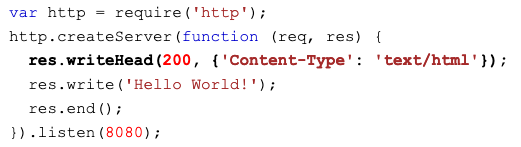
Read the Query String
The req argument in the method allow to see the url where you are at the moment, for example, if you are in localhost:8080/summer, the req.url will show the word /summer.
Split the Query String
It is also possible to split some information from the Query, an example:
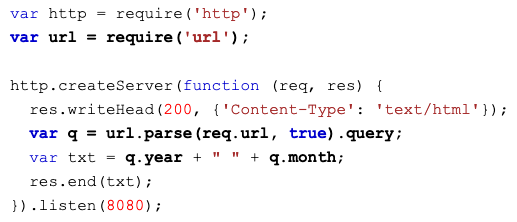
So if you put: http://localhost:8080/?year=2017&month=July, the result will be 2017 July
Node.js File System Module
Node-js as a File Server
The Node.js file system module allows you to work with the file system on your computer.
To include this module: var fs = require('fs');
Some common use for this module:
- Read files
- Create files
- Update files
- Delete files
- Rename files
Read Files
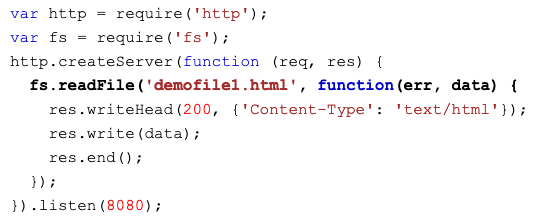
The method fs.readFile() is used to read files on your computer.
If you have a .html file, you can use the Node.js module to read it an show it.
Create Files